
Overview
iBuildNew leads are integrated into HubSpot using Zapier Mailparser. All states use one national iBuildNew Mailparser address.
For all existing Cedar Woods projects currently listed on iBuildNew, the national Mailparser setup has already been completed.
For any new project added to iBuildNew, the iBuildNew team must be advised to send lead notifications to both:
- National Mailparser: cedaibuildnew@robot.zapier.com
- Relevant Project Inbox: the project-specific enquiry mailbox
The lead notification must be sent to both addresses so the enquiry can be processed through the integration while also being received by the relevant project team.
iBuildNew Configuration
For any new Cedar Woods project added to iBuildNew, confirm that the lead notification setup includes both recipients below:
|
Required lead notification recipients 1. National Mailparser — cedaibuildnew@robot.zapier.com 2. Relevant Project Inbox — project-specific enquiry mailbox |
This should be completed as part of the standard iBuildNew project setup process.
Validate the Project and Project Affiliation
Before updating the HubSpot workflow:
- Submit or review an iBuildNew enquiry for the project.
- Confirm the relevant project inbox receives the enquiry.
- Validate the project name shown in the enquiry.
- Confirm the corresponding Project Affiliation (text) value in HubSpot.
|
Example Project: Clara Place Project Affiliation (text): Clara Place |
The Project Affiliation (text) value must match the project's agreed HubSpot naming convention.
Update the HubSpot Project BAU Global Workflow
For every project listed on iBuildNew, update the relevant Project BAU Global Workflow.
Update the enrolment criteria
Add a new enrolment criteria group using:
|
Enrolment criteria Project Affiliation (text) = [Project Name] AND digitalsource = ibuildnew |
Example for Clara Place: Project Affiliation (text) = Clara Place AND digitalsource = ibuildnew.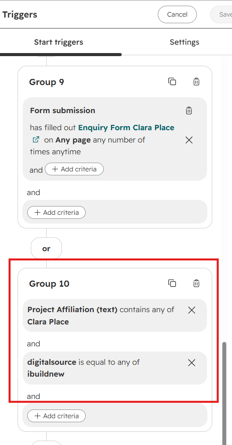
Add the iBuildNew Branch
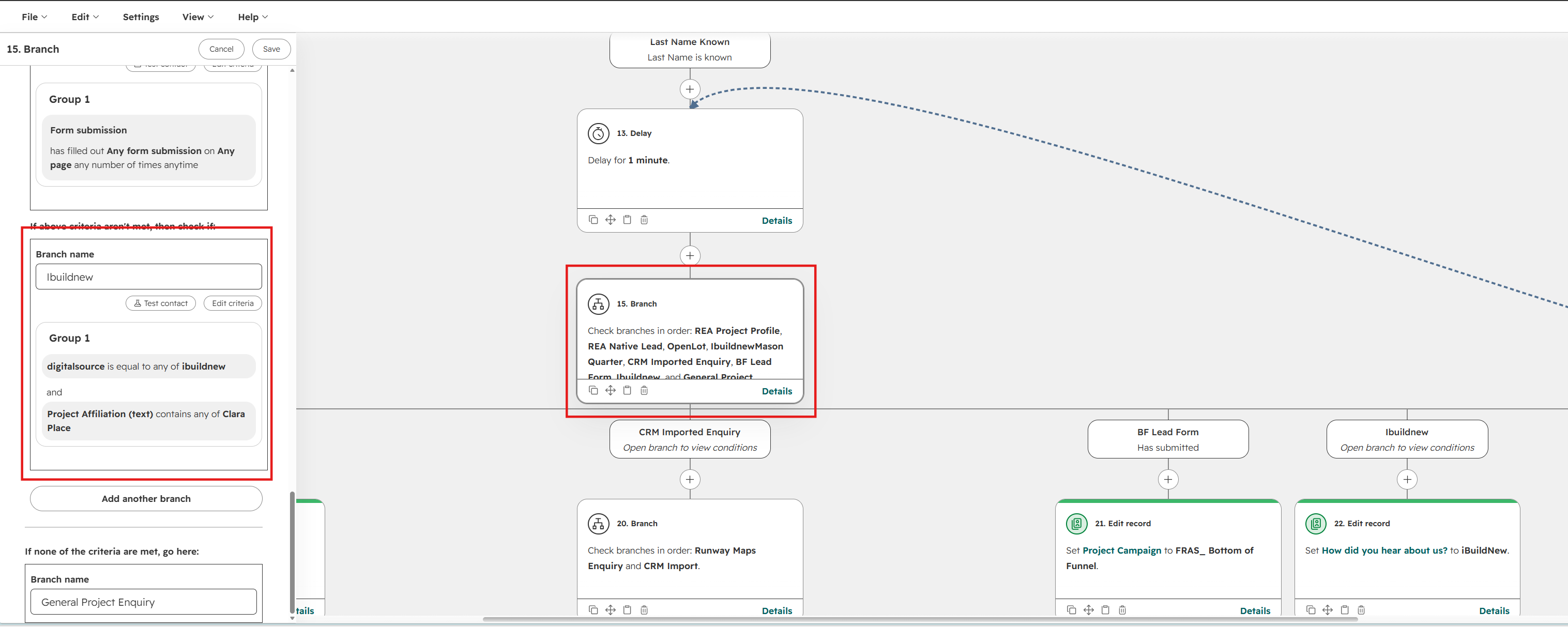
Within the existing workflow, add a new branch called iBuildNew using the following conditions:
|
iBuildNew branch criteria digitalsource = ibuildnew AND Project Affiliation (text) = [Project Name] |
Add the iBuildNew-Specific Actions
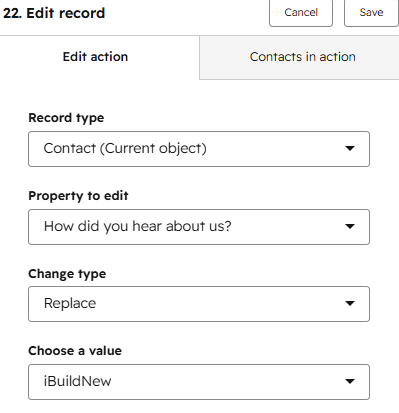
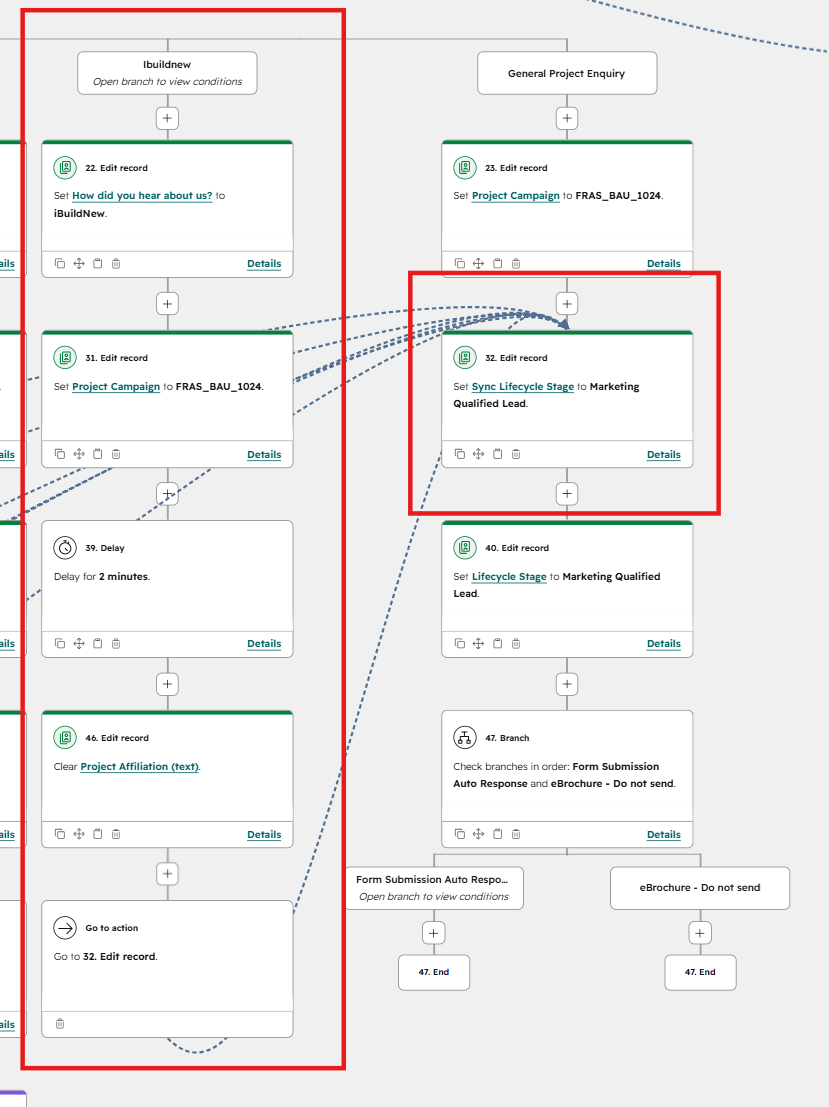
Action 1 – Set “How did you hear about us?”
Add an Edit record action and set: How did you hear about us? = iBuildNew
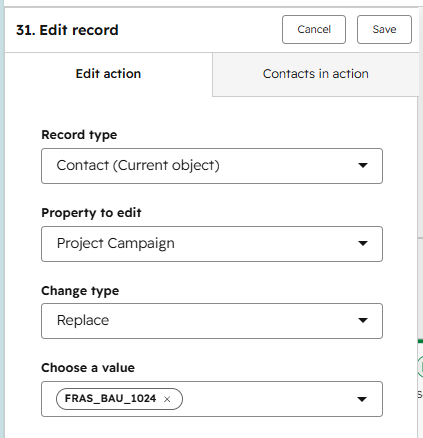
Action 2 – Set Project Campaign
Add an Edit record action and set: Project Campaign = [Relevant Project BAU Campaign]
Example: FRAS_BAU_1024. Use the existing BAU project campaign or relevant project campaign.
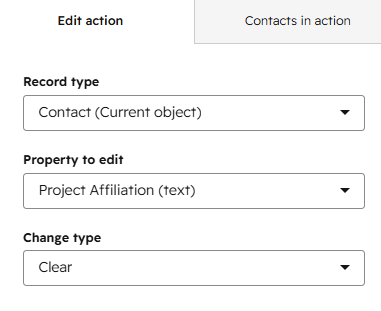
Action 3 – Delay & Clear Project Affiliation (text)
Add Delay of 2 mins
Add an Edit record action and set: Property to Edit "Project affiliation (text)
Change Type = Clear
Action 3 – Rejoin the Existing General Project Enquiry Process
After the iBuildNew-specific fields have been updated, add a Go to action pointing to the existing Sync Lifecycle Stage to Marketing Qualified Lead action.
This allows the iBuildNew enquiry to rejoin the existing General Project Enquiry workflow path without recreating the remaining workflow actions.
|
Workflow path iBuildNew branch → Set “How did you hear about us?” → Set Project Campaign → Clear "Project affiliation (text)→ Go to existing MQL action → Continue existing workflow |
BAU Process Going Forward
Whenever a new project is added to iBuildNew, follow the standard sequence below:
|
BAU sequence iBuildNew listing created → Add National Mailparser + Project Inbox → Validate enquiry and Project Affiliation → Update Project BAU Global Workflow → Add iBuildNew branch → Test end-to-end → Go live |
This should form part of the standard setup checklist for all future iBuildNew project listings.
BAU reminder: For future projects, the iBuildNew team must be informed of both lead notification recipients before go-live, and the HubSpot workflow changes must be completed and tested before deployment.