
HubSpot Design Manager Setup
Before creating custom landing pages in HubSpot, ensure the Design Manager is configured with flexible, reusable templates and modules.
This requires adjustments to the underlying HTML/CSS to align with project branding and functionality requirements.
Creating Styled Modules for Landing Pages
This guide walks you through creating styled, reusable modules for landing pages—ensuring consistency and ease of implementation across your projects.
Updating Header
Update the header module with the project logos, navigation bar, phone number and more.
Updating Footer
Update the footer module with the contact details, quick links and more.
Customising your Favicon for your HS pages
What is a Favicon?
A favicon (short for favorites icon) is a small image for your website that can be seen on a browser tab.
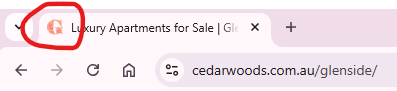
Follow the below steps to update your Favicon.
Favicon code missing from your Javascript file?
Follow these steps.
Step 1: Paste the below code into the top of your Javascript file.
(function() {
var link = document.querySelector("link[rel*='shortcut icon']") || document.createElement('link');
link.type = 'image/x-icon';
link.rel = 'shortcut icon';
link.href = 'ADD YOUR IMAGE LINK HERE';
document.getElementsByTagName('head')[0].appendChild(link);
})();
Step 2: Paste the link to your Favicon image on the link.href line, where it says 'Add your image link here'.
Ensure to keep the link in between the apostrophes.
Step 3: Click publish changes.